FastAPI Kubernetes DevSecOps Platform
A practical Kubernetes project that extends an existing FastAPI DevSecOps platform into a container-orchestrated deployment using k3d, Kubernetes, Traefik Ingress, PostgreSQL, Helm, and basic Kubernetes security hardening.
The goal of this project is not to build an over-engineered enterprise cluster. The goal is to show that the application can be deployed, configured, exposed, and managed in a realistic Kubernetes environment while keeping the setup understandable and reproducible.
Table of Contents
- Project Overview
- What This Project Demonstrates
- What Is Kubernetes?
- Why Kubernetes Was Added
- Architecture
- Tech Stack
- Core Kubernetes Concepts Used
- Repository Structure
- Prerequisites
- Local Kubernetes Cluster Setup
- Docker Images
- Kubernetes Manifests
- Helm Deployment
- Ingress and Local URLs
- Security Hardening
- Persistence
- Useful Commands
- Screenshots
- Troubleshooting Notes
- What I Learned
- Disclaimer
Project Overview
This repository is based on an existing FastAPI DevSecOps platform and adds a Kubernetes-based deployment layer on top of it.
The application consists of three main components:
- Frontend served through Nginx
- Backend built with FastAPI
- PostgreSQL database with persistent storage
Instead of running everything only with Docker Compose, the application is deployed into a local Kubernetes cluster using k3d. The project includes Kubernetes manifests and a Helm chart to make the deployment reusable and easier to manage.
The final result is a local Kubernetes environment where the frontend, backend, and database run as separate workloads and communicate through Kubernetes services.
What This Project Demonstrates
This project demonstrates practical knowledge of:
- Containerized application deployment
- Kubernetes workloads and networking
- Local cluster management with k3d
- Service discovery inside Kubernetes
- Ingress routing with Traefik
- ConfigMaps and Secrets
- Persistent storage for PostgreSQL
- Helm chart packaging
- Basic security hardening for Kubernetes workloads
- Health checks with readiness and liveness probes
- Resource requests and limits
What Is Kubernetes?
Kubernetes is a system for managing containers.
With Docker Compose, containers are usually started directly on one machine:
Docker Compose
├── frontend
├── backend
└── postgres
This works well for local development. However, Docker Compose is limited when an application needs to scale, recover from failures, or run across multiple machines.
Kubernetes solves this by acting as a container orchestrator.
That means Kubernetes can:
- Start containers
- Restart failed containers
- Expose applications through services
- Store configuration separately from application code
- Manage secrets
- Scale workloads
- Route traffic
- Attach persistent storage
- Monitor if applications are healthy
A simple way to understand Kubernetes:
Docker runs containers. Kubernetes manages containers.
In this project, Kubernetes is used to run the frontend, backend, and PostgreSQL database in a structured and reproducible way.
Why Kubernetes Was Added
The original project already had a strong DevSecOps foundation with containerization and security tooling. Kubernetes was added as the next infrastructure layer to make the project more realistic for modern DevOps, DevSecOps, and cloud-native environments.
The goal was to learn and demonstrate how an application can move from a Docker-based setup to a Kubernetes-based setup.
The Kubernetes setup adds:
- Better separation between application components
- Internal networking through Kubernetes services
- Config and secret management
- Persistent database storage
- Ingress routing through Traefik
- Health checks
- Resource control
- Helm-based deployment
Architecture
High-level architecture:
Browser
  │
  ▼
Traefik Ingress
  │
  ├── frontend.localhost ──► frontend-service ──► frontend pod
  │
  └── api.localhost ──────► backend-service ───► backend pod
                                      │
                                      ▼
                              postgres-service
                                      │
                                      ▼
                                postgres pod
                                      │
                                      ▼
                              Persistent Volume
Inside the Kubernetes cluster:
Namespace: devsecops

├── Backend Deployment
│   └── FastAPI backend pod
│
├── Frontend Deployment
│   └── Nginx frontend pod
│
├── PostgreSQL Deployment
│   └── PostgreSQL pod
│
├── Services
│   ├── backend-service
│   ├── frontend-service
│   └── postgres-service
│
├── ConfigMap
│   └── non-sensitive backend configuration
│
├── Secret
│   └── sensitive backend values
│
├── PersistentVolumeClaim
│   └── PostgreSQL storage
│
└── Ingress
    └── Traefik routing for local URLs
Tech Stack
| Technology | Purpose |
|---|---|
| FastAPI | Backend API |
| PostgreSQL | Database |
| Nginx | Serves the frontend build |
| Docker | Builds application images |
| Kubernetes | Container orchestration |
| k3d | Local Kubernetes cluster using Docker |
| k3s | Lightweight Kubernetes distribution used by k3d |
| kubectl | CLI tool to interact with Kubernetes |
| Traefik | Ingress controller and reverse proxy |
| Helm | Kubernetes package manager |
| ConfigMap | Non-sensitive configuration |
| Secret | Sensitive configuration |
| PersistentVolumeClaim | Persistent database storage |
Core Kubernetes Concepts Used
Cluster
A Kubernetes cluster is the environment where workloads run.
In this project, the cluster is created locally with k3d:
k3d cluster create devsecops-cluster \
  -p "80:80@loadbalancer" \
  -p "443:443@loadbalancer"
This creates a local Kubernetes cluster that runs inside Docker.
Node
A node is a machine that runs Kubernetes workloads.
In this local setup, k3d creates a Kubernetes node inside Docker.
Example:
kubectl get nodes
Namespace
A namespace is used to logically separate Kubernetes resources.
This project uses:
devsecops
All application resources are deployed into this namespace.
Pod
A pod is the smallest deployable unit in Kubernetes.
Usually, one pod contains one application container.
In this project:
backend pod   -> FastAPI container
frontend pod  -> Nginx container
postgres pod  -> PostgreSQL container
Deployment
A Deployment tells Kubernetes how to run an application.
It defines:
- Which image to use
- How many replicas to run
- Which ports to expose inside the pod
- Health checks
- Resource limits
- Security settings
If a pod crashes, the Deployment ensures that Kubernetes starts a new one.
Service
Pods can change their internal IP address. A Service gives them a stable network address.
In this project:
backend-service
frontend-service
postgres-service
The backend connects to PostgreSQL through:
postgres-service
This is important because localhost inside a pod means the pod itself, not another container.
ConfigMap
A ConfigMap stores non-sensitive configuration.
Examples:
PROJECT_NAME
ENVIRONMENT
POSTGRES_SERVER
POSTGRES_PORT
BACKEND_CORS_ORIGINS
This keeps configuration separate from the container image.
Secret
A Secret stores sensitive values.
Examples:
SECRET_KEY
POSTGRES_PASSWORD
FIRST_SUPERUSER_PASSWORD
SMTP_PASSWORD
For local development, placeholder values are used. In production, these values should be replaced with strong secrets and managed securely.
PersistentVolumeClaim
A PersistentVolumeClaim is used to request storage for a pod.
PostgreSQL needs persistent storage because database data should not disappear when the pod restarts.
This project uses a PVC for PostgreSQL data.
Ingress
Ingress exposes services through HTTP routes.
Instead of using port-forwarding, Traefik routes traffic to the correct service.
This project uses:
http://frontend.localhost
http://api.localhost/docs
Helm
Helm is the package manager for Kubernetes.
Instead of applying many YAML files manually, Helm packages them into a chart.
With Helm, the whole platform can be installed or upgraded with one command.
Repository Structure
Example structure:
.
├── backend/
├── frontend/
├── k8s/
│   ├── namespace.yaml
│   ├── backend-configmap.yaml
│   ├── backend-secret.yaml
│   ├── backend-deployment.yaml
│   ├── backend-service.yaml
│   ├── frontend-deployment.yaml
│   ├── frontend-service.yaml
│   ├── postgres-deployment.yaml
│   ├── postgres-service.yaml
│   ├── postgres-pvc.yaml
│   └── ingress.yaml
│
├── helm/
│   └── fastapi-kubernetes-platform/
│       ├── Chart.yaml
│       ├── values.yaml
│       └── templates/
│           ├── namespace.yaml
│           ├── backend-configmap.yaml
│           ├── backend-secret.yaml
│           ├── backend-deployment.yaml
│           ├── backend-service.yaml
│           ├── frontend-deployment.yaml
│           ├── frontend-service.yaml
│           ├── postgres-deployment.yaml
│           ├── postgres-service.yaml
│           ├── postgres-pvc.yaml
│           └── ingress.yaml
│
└── README.md
Prerequisites
Required tools:
- Docker Desktop
- kubectl
- k3d
- Helm
- Git
Check versions:
docker --version
kubectl version --client
k3d version
helm version
Install k3d with Homebrew:
brew install k3d
Install Helm with Homebrew:
brew install helm
Local Kubernetes Cluster Setup
Create a local k3d cluster:
k3d cluster create devsecops-cluster \
  -p "80:80@loadbalancer" \
  -p "443:443@loadbalancer"
The port mapping is important because Traefik should be reachable directly through the browser without using port-forwarding.
Check if the cluster is running:
kubectl get nodes
Expected result:
NAME                             STATUS   ROLES                  VERSION
k3d-devsecops-cluster-server-0   Ready    control-plane,master   ...
Docker Images
The Kubernetes cluster needs container images for the backend and frontend.
Build the backend image:
docker build -t backend:latest -f backend/Dockerfile .
Build the frontend image:
docker build -t frontend:latest -f frontend/Dockerfile .
Import the images into the k3d cluster:
k3d image import backend:latest -c devsecops-cluster
k3d image import frontend:latest -c devsecops-cluster
This is needed because the cluster runs inside Docker and does not automatically know every local image from the host system.
Kubernetes Manifests
The k8s/ directory contains raw Kubernetes YAML files.
These files can be applied manually:
kubectl apply -f k8s/namespace.yaml
kubectl apply -f k8s/backend-configmap.yaml
kubectl apply -f k8s/backend-secret.yaml
kubectl apply -f k8s/postgres-pvc.yaml
kubectl apply -f k8s/postgres-deployment.yaml
kubectl apply -f k8s/postgres-service.yaml
kubectl apply -f k8s/backend-deployment.yaml
kubectl apply -f k8s/backend-service.yaml
kubectl apply -f k8s/frontend-deployment.yaml
kubectl apply -f k8s/frontend-service.yaml
kubectl apply -f k8s/ingress.yaml
However, the preferred deployment method for this project is Helm.
Helm Deployment
The Helm chart is located here:
helm/fastapi-kubernetes-platform/
Validate the Chart
helm lint ./helm/fastapi-kubernetes-platform
Expected result:
1 chart(s) linted, 0 chart(s) failed
Install the Application
helm install fastapi-platform ./helm/fastapi-kubernetes-platform
Upgrade the Application
After changing templates or values:
helm upgrade fastapi-platform ./helm/fastapi-kubernetes-platform
List Helm Releases
helm list
Uninstall the Release
helm uninstall fastapi-platform
If the namespace should also be removed:
kubectl delete namespace devsecops
Ingress and Local URLs
Traefik is used as the Ingress controller.
The local URLs are:
http://frontend.localhost
http://api.localhost/docs
The Ingress routes traffic like this:
frontend.localhost -> frontend-service -> frontend pod
api.localhost      -> backend-service  -> backend pod
Check the Ingress:
kubectl get ingress -n devsecops
Security Hardening
This project includes basic Kubernetes security hardening.
Non-root Containers
The backend and frontend containers run as non-root users.
Backend example:
securityContext:
  runAsNonRoot: true
  runAsUser: 10001
  runAsGroup: 10001
  allowPrivilegeEscalation: false
Frontend example:
securityContext:
  runAsNonRoot: true
  runAsUser: 101
  runAsGroup: 101
  allowPrivilegeEscalation: false
This reduces the risk if a container is compromised.
Resource Requests and Limits
Resource requests and limits are configured for backend, frontend, and PostgreSQL.
This prevents containers from consuming unlimited CPU or memory.
Example:
resources:
  requests:
    memory: "128Mi"
    cpu: "100m"
  limits:
    memory: "512Mi"
    cpu: "500m"
Readiness and Liveness Probes
Health checks are used to let Kubernetes know whether a container is ready and healthy.
- Readiness probe: decides if the pod should receive traffic
- Liveness probe: decides if the pod should be restarted
Backend uses HTTP probes. Frontend uses HTTP probes. PostgreSQL uses TCP probes.
ConfigMap and Secret Separation
Non-sensitive configuration is stored in a ConfigMap. Sensitive values are stored in a Secret.
This follows a cleaner DevSecOps approach than hardcoding everything inside application code.
Persistence
PostgreSQL uses a PersistentVolumeClaim.
This means the database data can survive pod restarts.
Check PVC status:
kubectl get pvc -n devsecops
Expected result:
postgres-pvc Bound
Useful Commands
Check all pods:
kubectl get pods -n devsecops
Check services:
kubectl get svc -n devsecops
Check ingress:
kubectl get ingress -n devsecops
Check Helm releases:
helm list
View backend logs:
kubectl logs -n devsecops deployment/backend
View frontend logs:
kubectl logs -n devsecops deployment/frontend
View PostgreSQL logs:
kubectl logs -n devsecops deployment/postgres
Restart a deployment:
kubectl rollout restart deployment/backend -n devsecops
Check rollout status:
kubectl rollout status deployment/backend -n devsecops
Describe a pod:
kubectl describe pod <pod-name> -n devsecops
Screenshots
Add screenshots of the running Kubernetes setup here.
Recommended screenshots:
1. Kubernetes Pods
Command:
kubectl get pods -n devsecops
Suggested image:

2. Kubernetes Services
Command:
kubectl get svc -n devsecops
Suggested image:

3. Kubernetes Ingress
Command:
kubectl get ingress -n devsecops
Suggested image:

4. Helm Release
Command:
helm list
Suggested image:

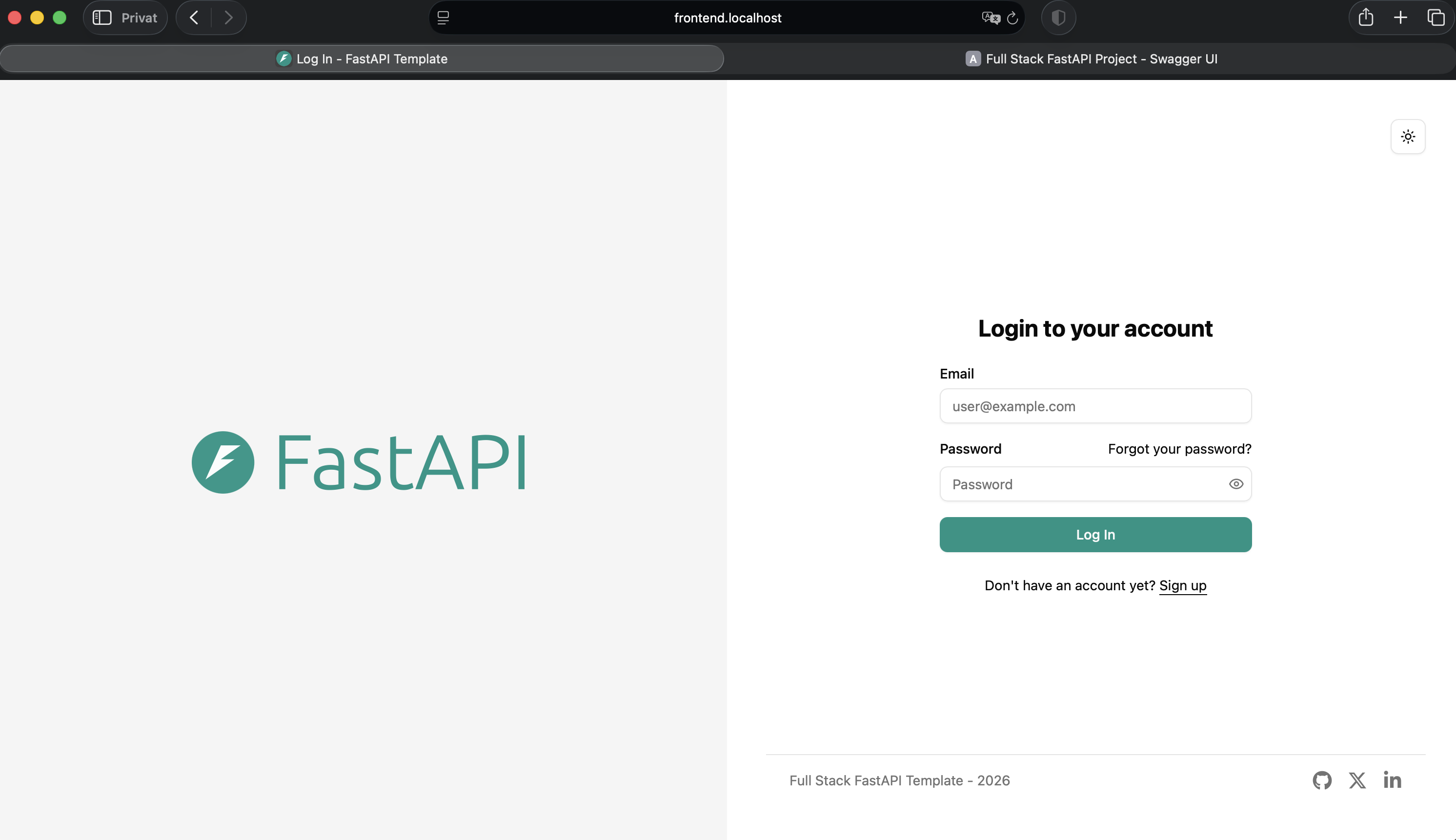
5. Frontend
URL:
http://frontend.localhost
Suggested image:
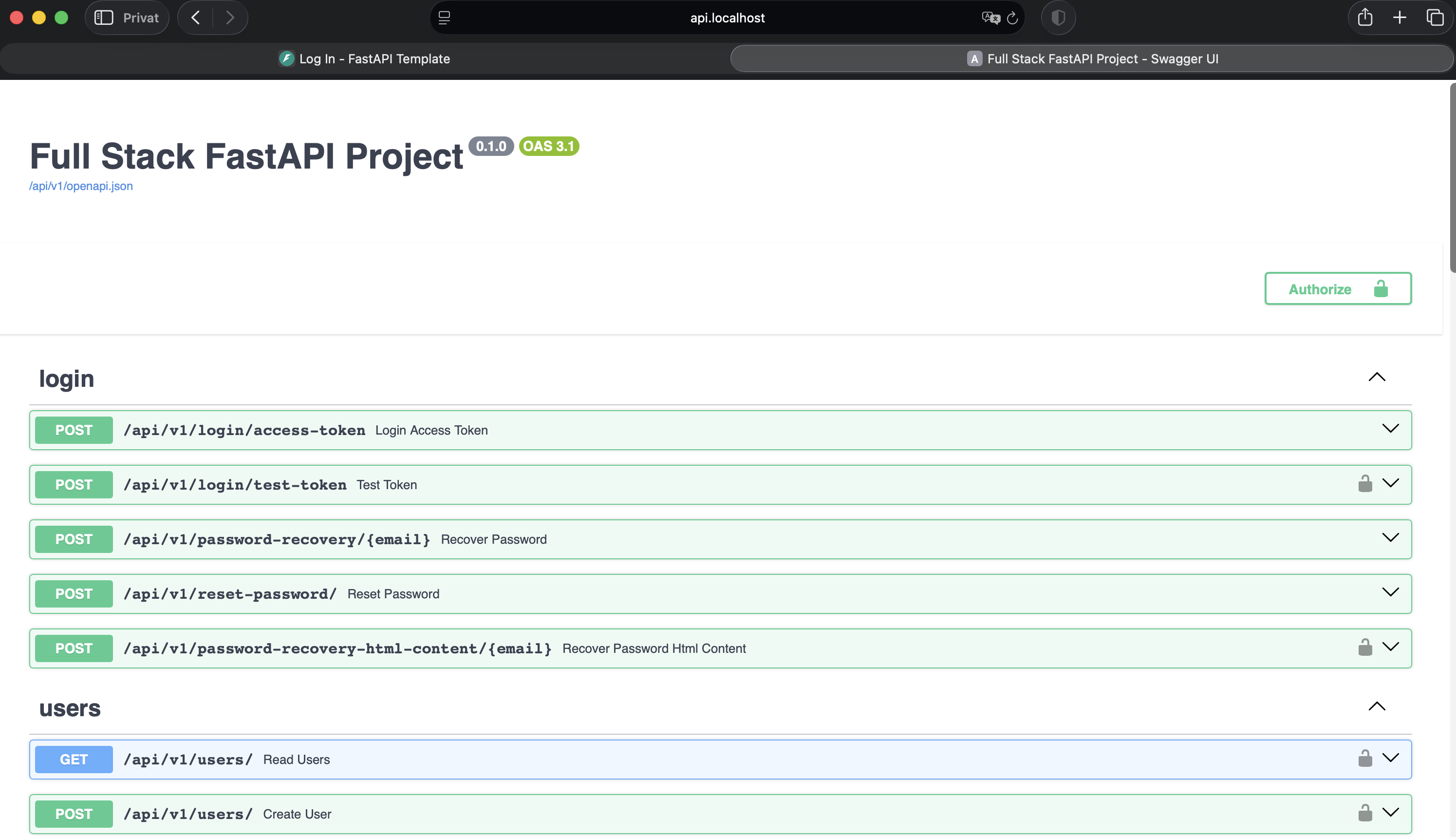
6. Backend API Docs
URL:
http://api.localhost/docs
Suggested image:
What I Learned
Through this project, I learned how Kubernetes changes the way containerized applications are deployed and managed.
The most important learning points were:
kubectlis the CLI used to communicate with Kubernetes- k3d can create a lightweight local Kubernetes cluster using Docker
- Kubernetes does not run source code directly; it runs container images
- Pods are the smallest running units in Kubernetes
- Deployments keep pods running and replace failed pods automatically
- Services provide stable internal networking
localhostinside a pod does not mean the host machine or another pod- ConfigMaps and Secrets separate configuration from application code
- PostgreSQL needs persistent storage through a PVC
- Ingress exposes services through clean local URLs
- Helm packages Kubernetes resources into a reusable chart
- Security hardening can be added through non-root users, resource limits, and health checks
The project helped me understand the difference between simply running containers and managing containerized infrastructure.
Disclaimer
This project is intended for learning and portfolio purposes.
The local secrets and placeholder passwords are used only for local development. In a real production environment, secrets must be replaced with strong values and managed using a secure secret management solution.