File Integrity Checker
A Python-based security tool for monitoring file integrity by creating a trusted baseline of file hashes and comparing future scans against that baseline.
This project was built to demonstrate practical Cyber Security, Detection Engineering, and Python scripting skills in a realistic and useful way. The tool can detect whether files have been added, deleted, or modified, and it can export results as a CLI report, CSV report, and HTML report. It also includes a watch mode for continuous monitoring.
The purpose of this project is to simulate a simplified integrity monitoring workflow similar to what is used in real-world security environments to detect suspicious file changes, unauthorized tampering, or unexpected modifications.
Table of Contents
- File Integrity Checker
- Project Overview
- Why This Project Matters
- Features
- Tech Stack
- How It Works
- Prerequisites
- Quickstart
- How to Run the Tool
- Usage
- Reports
- Screenshots
- What Was Implemented and Why
- Security Relevance
- Possible Improvements
Project Overview
This repository contains a Python script called integrity-checker.py that performs file integrity monitoring on a chosen file or directory.
The tool creates a baseline by hashing files with a chosen algorithm such as SHA-256 and saving the results in a JSON file. Later, the tool scans the same directory again and compares the current file hashes with the stored baseline. If a file was changed, removed, or newly created, the tool reports it clearly.
In addition to terminal output, the tool can also generate:
- a CSV report for structured export
- an HTML report for easier visualization
- a watch mode for repeated automatic checks
Why This Project Matters
File integrity monitoring is an important concept in Cyber Security because it helps detect:
- unauthorized file modifications
- malicious tampering
- suspicious configuration changes
- unexpected new files
- accidental deletions
This kind of monitoring is relevant for:
- system administration
- incident response
- hardening critical systems
- change tracking
- detection engineering
- Security Operations Center workflows
Although this project is a simplified standalone Python implementation, it follows the same core principle used by larger integrity monitoring solutions.
Features
| Feature | Description |
|---|---|
| Baseline creation | Stores the original file state in a JSON file |
| Integrity checking | Detects added, deleted, and modified files |
| Recursive scanning | Scans all files in a directory and subdirectories |
| Multiple hash algorithms | Supports md5, sha1, sha256, and sha512 |
| Colored CLI output | Improves readability in the terminal |
| CSV export | Exports scan results into a structured CSV file |
| HTML export | Creates a readable visual report in HTML format |
| Include patterns | Allows scanning only matching file types |
| Exclude patterns | Ignores unwanted files and directories |
| Default excludes | Automatically ignores .git, __pycache__, .DS_Store, etc. |
| Watch mode | Repeatedly checks files at a defined interval |
Tech Stack
| Component | Purpose |
|---|---|
| Python 3 | Main programming language |
hashlib | Hash generation for integrity checking |
json | Baseline storage |
csv | CSV report export |
html | Safe HTML output |
argparse | CLI argument parsing |
fnmatch | Include and exclude pattern matching |
colorama | Colored terminal output |
pathlib | File and path handling |
How It Works
1. Baseline Creation
The tool scans the selected target path and calculates a hash for each file. These hashes are then saved in a baseline JSON file.
This baseline represents the trusted initial state of the monitored files.
2. Integrity Check
When the check command is executed, the tool scans the files again and compares the current hashes with the baseline.
It classifies files into four categories:
- Added
- Deleted
- Modified
- Unchanged
3. Reporting
After a comparison, the tool can display the results in the terminal and optionally export the results into:
- a CSV file
- an HTML report
4. Watch Mode
The watch mode repeats the integrity check every few seconds. This simulates a simple continuous monitoring workflow and allows file changes to be detected live during execution.
Prerequisites
Before using the tool, make sure the following software is available:
- Python 3.10 or newer
- pip
- a terminal environment such as macOS Terminal, Linux shell, or VS Code integrated terminal
Optional but recommended:
- a virtual environment
coloramafor colored CLI output
Quickstart
Clone the repository:
git clone <your-repository-url>
Move into the project directory:
cd file-integrity-checker
Create a virtual environment:
python3 -m venv venv
Activate the virtual environment:
source venv/bin/activate
Install the dependency:
pip install colorama
Create a baseline:
python3 integrity_checker_v2.py baseline /path/to/target --output baseline.json
Run a check:
python3 integrity_checker_v2.py check /path/to/target --baseline baseline.json
How to Run the Tool
1. Create a Virtual Environment
python3 -m venv venv
2. Install Dependencies
Activate the environment:
source venv/bin/activate
Install colorama:
pip install colorama
3. Create a Test Folder
mkdir test-integrity
cd test-integrity
Create test files:
echo "hello world" > file1.txt
echo "secure config" > config.txt
Move back to the project directory if needed.
4. Create a Baseline
python3 integrity_checker_v2.py baseline ./test-integrity --output baseline.json
5. Run an Integrity Check
python3 integrity_checker_v2.py check ./test-integrity --baseline baseline.json
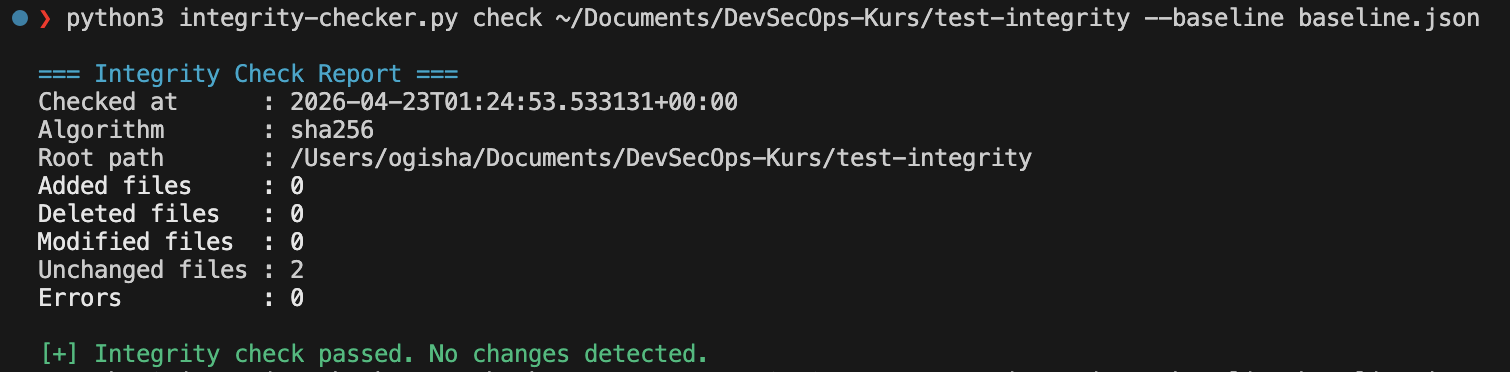
At this point, no changes should be detected.
6. Simulate File Changes
Modify a file:
echo "hacked" >> ./test-integrity/file1.txt
Create a new file:
echo "new file" > ./test-integrity/newfile.txt
Delete a file:
rm ./test-integrity/config.txt
7. Run the Check Again
python3 integrity_checker_v2.py check ./test-integrity --baseline baseline.json
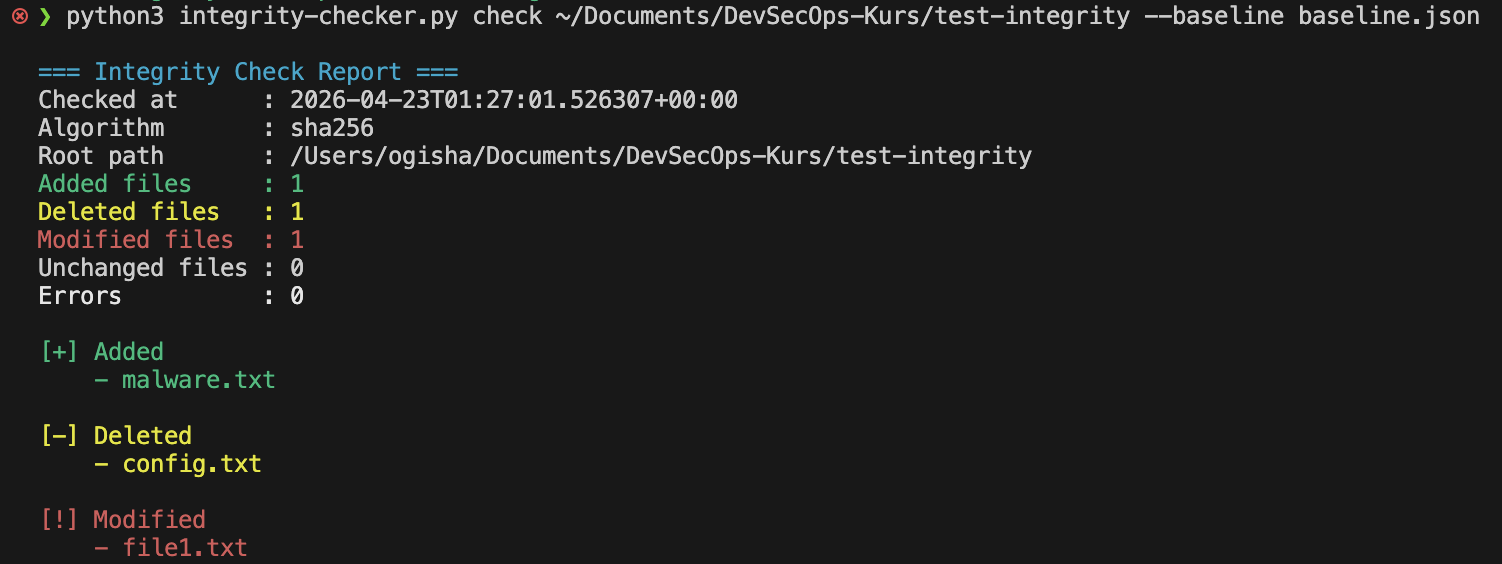
Now the tool should report:
- one modified file
- one added file
- one deleted file
8. Generate Reports
Generate an HTML report:
python3 integrity_checker_v2.py check ./test-integrity --baseline baseline.json --html-report report.html
Generate a CSV report:
python3 integrity_checker_v2.py check ./test-integrity --baseline baseline.json --csv-report report.csv
Generate both:
python3 integrity_checker_v2.py check ./test-integrity --baseline baseline.json --html-report report.html --csv-report report.csv
9. Run Watch Mode
python3 integrity_checker_v2.py watch ./test-integrity --baseline baseline.json --interval 5
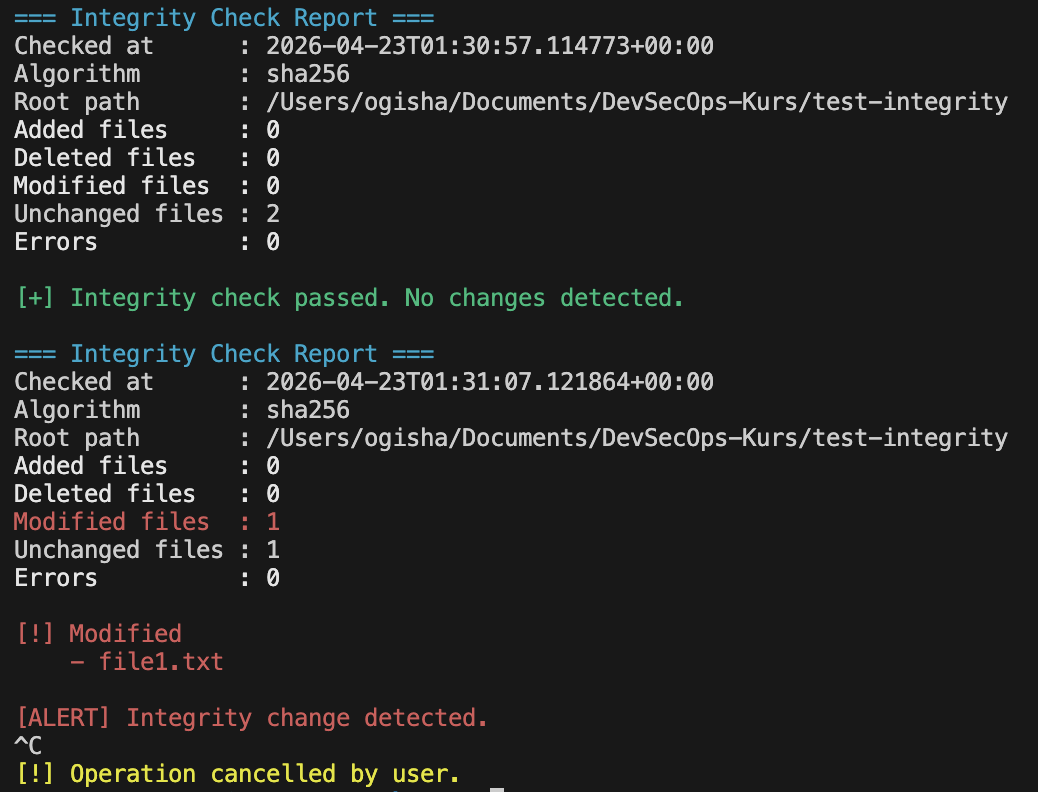
This command checks the target every 5 seconds and prints an alert if the file state changes.
Usage
Create a Baseline
python3 integrity_checker_v2.py baseline /path/to/target --output baseline.json
Check Files Against the Baseline
python3 integrity_checker_v2.py check /path/to/target --baseline baseline.json
Generate an HTML Report
python3 integrity_checker_v2.py check /path/to/target --baseline baseline.json --html-report report.html
Generate a CSV Report
python3 integrity_checker_v2.py check /path/to/target --baseline baseline.json --csv-report report.csv
Use Include Patterns
Scan only Python files:
python3 integrity_checker_v2.py baseline /path/to/target --output baseline.json --include "*.py"
Use Exclude Patterns
Ignore log files:
python3 integrity_checker_v2.py baseline /path/to/target --output baseline.json --exclude "*.log"
Ignore a full directory pattern:
python3 integrity_checker_v2.py baseline /path/to/target --output baseline.json --exclude "logs/*"
Run Continuous Monitoring
python3 integrity_checker_v2.py watch /path/to/target --baseline baseline.json --interval 10
Reports
The tool can produce the following outputs:
| Report Type | Purpose |
|---|---|
| Terminal output | Quick analysis in the console |
| JSON baseline | Trusted reference of original hashes |
| CSV report | Structured export for analysis or documentation |
| HTML report | Human-readable visual report |
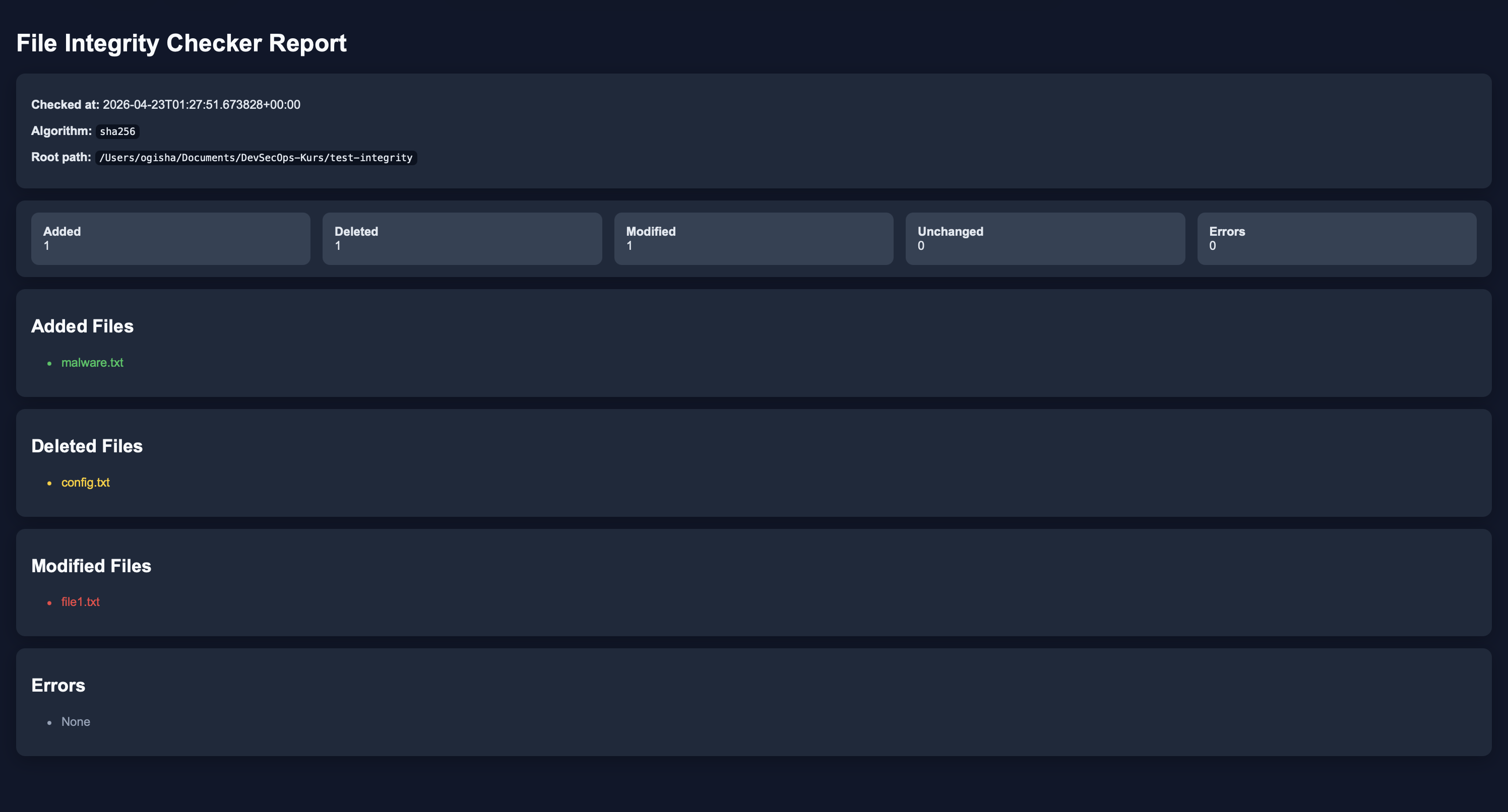
The HTML report is especially useful for screenshots, portfolio documentation, and demonstrating project results in a clean format.
Screenshots
The following screenshots can be added to document the tool and demonstrate its functionality:
1. Baseline Creation
Shows the successful creation of the initial baseline JSON file.

2. Integrity Check – No Changes Detected
Shows a clean check where no file changes were detected.
3. Integrity Check – Changes Detected
Shows a scan where files were added, deleted, or modified.
4. HTML Report
Shows the generated visual HTML report.
5. Watch Mode
Shows the watch mode first in a normal state and then after a change was detected.
What Was Implemented and Why
Baseline JSON storage
Implemented so the tool has a trusted reference state to compare against later.
Hash-based comparison
Implemented because hashes are a reliable way to detect even very small file changes.
Multiple algorithms
Implemented to make the tool more flexible and educational.
Include and exclude patterns
Implemented to give the user control over what should or should not be scanned.
Default excludes
Implemented to avoid noise from automatically generated files and directories.
CSV report export
Implemented to support structured exports and easier external review.
HTML report export
Implemented to make the results easier to read and present visually.
Watch mode
Implemented to simulate lightweight continuous security monitoring.
Colored terminal output
Implemented to improve readability and make results easier to interpret quickly.
Security Relevance
This project demonstrates important security concepts such as:
- file integrity monitoring
- change detection
- hash comparison
- incident response thinking
- detection engineering
- security tooling with Python
Possible real-world use cases include:
- checking whether configuration files were modified
- monitoring sensitive folders for unauthorized changes
- verifying deployment artifacts
- demonstrating tampering detection concepts in a lab environment
Possible Improvements
Possible future improvements for this project include:
- email notifications when a change is detected
- file metadata comparison beyond hashes
- scheduled scans
- log file output
- GUI or web dashboard
- alert severity levels
- integration with a SIEM-style dashboard
- packaging the tool as an installable CLI utility
- support for checksum verification against signed files
- Linux daemon or background service mode