SOC & SIEM Infrastructure Lab
A practical Blue Team / SOC infrastructure lab built using Wazuh SIEM, File Integrity Monitoring (FIM), Fail2Ban, and a Cowrie SSH Honeypot to simulate realistic threat hunting, attack detection, and incident response workflows.
Overview
For this project, I built a realistic SOC (Security Operations Center) and Blue Team monitoring environment using Wazuh SIEM and multiple defensive security tools.
The goal was not only to deploy security software, but also to understand how:
- logs are collected
- suspicious behavior is detected
- brute-force attacks are analyzed
- incident response works
- automated banning works
- honeypots collect attacker behavior
- defensive security workflows operate in real-world environments
The environment simulated:
- SSH brute-force attacks
- privilege escalation
- reconnaissance activity
- file integrity monitoring
- honeypot interaction
- automated response mechanisms
Lab Architecture
Kali Linux (Attacker Machine)
            ↓
      Attack Simulation
            ↓
 Ubuntu Server VM (SOC Lab)
 ├── Wazuh SIEM
 ├── Wazuh Agent
 ├── File Integrity Monitoring
 ├── Fail2Ban
 ├── Cowrie SSH Honeypot
 └── Docker
The Ubuntu Server VM hosted all defensive security tooling.
Kali Linux was used to simulate attacks against the server.
Technologies Used
| Technology | Purpose |
|---|---|
| Ubuntu Server | Main SOC server |
| Kali Linux | Attack simulation |
| Wazuh | SIEM & threat hunting |
| Docker | Containerization |
| Fail2Ban | Automated response |
| Cowrie | SSH honeypot |
| OpenSSH | Remote access |
| VirtualBox | Ubuntu VM |
| Parallels | Kali Linux VM |
Installing Docker
Docker was used to simplify deployment and isolate services inside containers.
Update the system
sudo apt update
sudo apt upgrade -y
Install Docker
curl -sSL https://get.docker.com | sh
Install Docker Compose
sudo apt install docker-compose-plugin -y
Verify installation
docker --version
docker compose version
Docker made it significantly easier to:
- deploy Wazuh
- isolate services
- manage containers
- persist logs using volumes
- restart infrastructure quickly
Deploying Wazuh SIEM
Wazuh was deployed using the official Docker deployment.
Clone the repository
git clone https://github.com/wazuh/wazuh-docker.git
Navigate into the deployment folder
cd wazuh-docker/single-node
Generate certificates
docker compose -f generate-indexer-certs.yml run --rm generator
This generated the required TLS certificates for secure communication between Wazuh services.
Start the environment
docker compose up -d
This started:
- Wazuh Manager
- Wazuh Indexer
- Wazuh Dashboard
inside Docker containers.
Understanding the Wazuh Architecture
The Wazuh deployment consisted of multiple components working together.
| Component | Purpose |
|---|---|
| Wazuh Manager | Processes logs & alerts |
| Wazuh Indexer | Stores events |
| Wazuh Dashboard | Web interface |
| Wazuh Agent | Collects endpoint logs |
The Wazuh Agent was installed directly on the Ubuntu Server VM.
This allowed the server to:
- collect authentication logs
- monitor file changes
- monitor privilege escalation
- forward logs into the SIEM
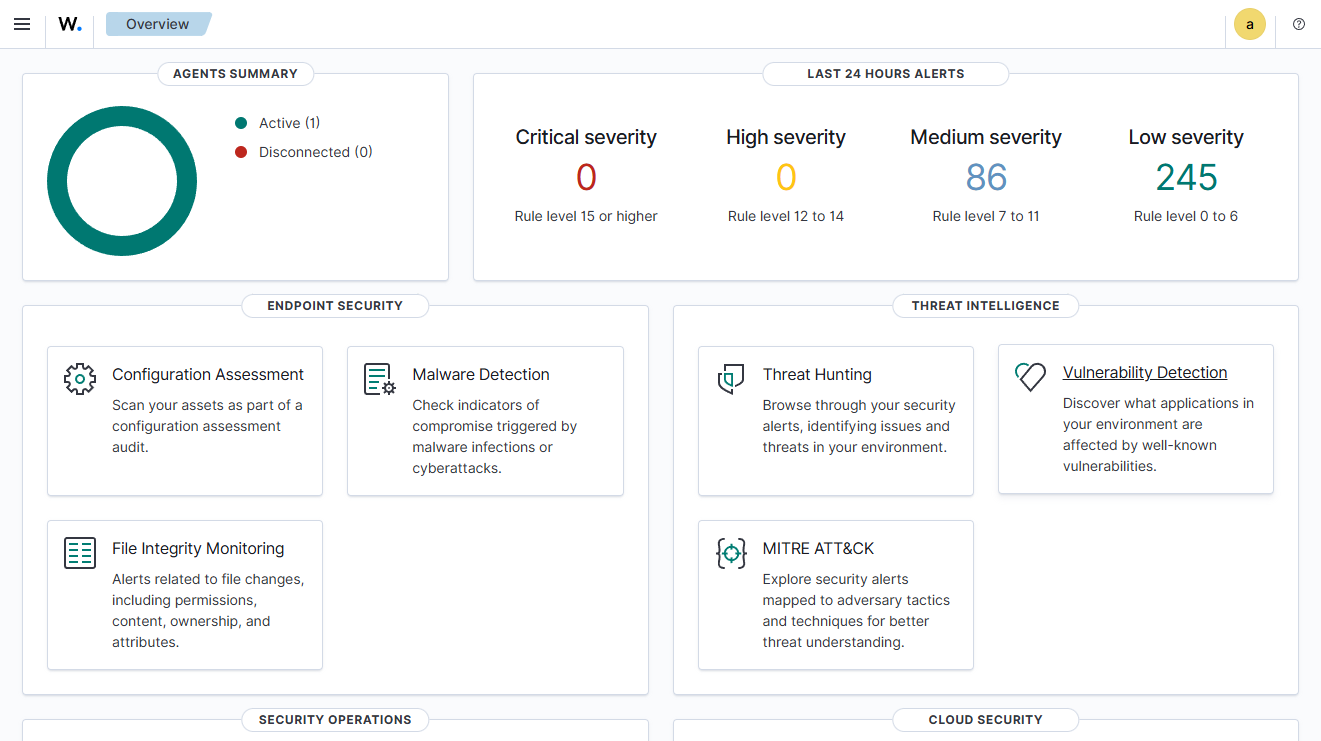
Wazuh Dashboard
The dashboard was accessible via:
https://SERVER-IP:8443
The dashboard was used for:
- Threat Hunting
- Event Analysis
- Rule Analysis
- Alert Investigation
- MITRE ATT&CK Analysis
Threat Hunting & Detection
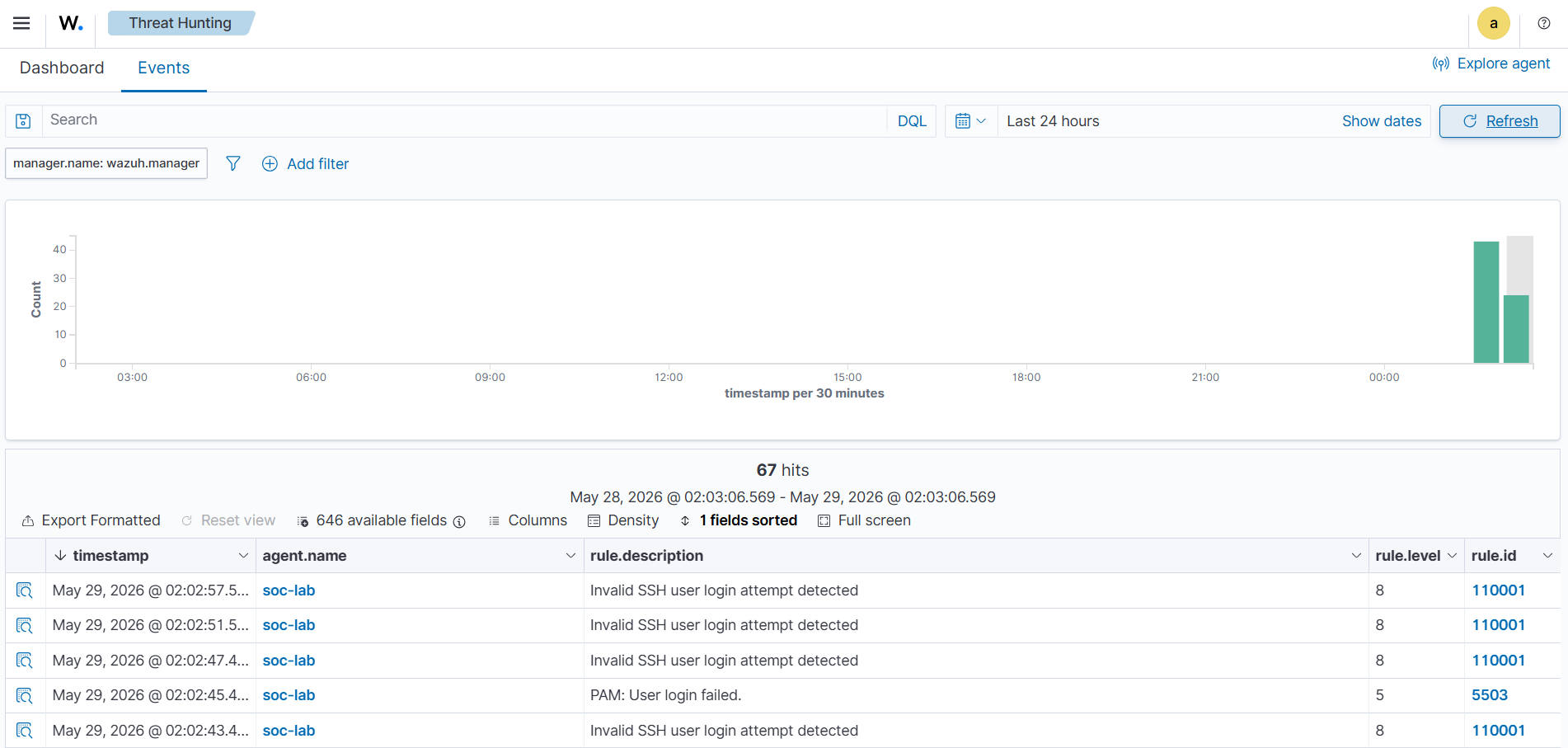
Threat Hunting refers to actively analyzing logs and alerts to identify suspicious activity.
Using the Wazuh dashboard, I analyzed:
- authentication failures
- SSH brute-force attempts
- privilege escalation activity
- suspicious login attempts
- file modifications
- honeypot login activity
During the project, I learned how SIEM systems correlate:
- logs
- rules
- severities
- events
- attack behavior
instead of simply displaying raw logs.
The dashboard made it possible to:
- inspect rule IDs
- analyze alert severities
- investigate suspicious behavior
- search through authentication logs
- identify attack patterns
Custom Detection Rules
Custom Wazuh detection rules were created using:
local_rules.xml
The purpose of these rules was to better understand:
- event correlation
- SIEM rule engines
- authentication monitoring
- brute-force detection
- detection engineering basics
Invalid SSH User Detection
<group name="local,syslog,sshd,">

  <rule id="110001" level="8">
    <if_sid>5710</if_sid>
    <match>invalid user</match>

    <description>
      Invalid SSH user login attempt detected
    </description>

    <group>
      ssh,authentication_failed,invalid_user,
    </group>
  </rule>

</group>
This rule detects:
- invalid usernames
- suspicious SSH login attempts
- automated login behavior
SSH Authentication Failure Rule
<rule id="110002" level="6">
  <if_sid>5710</if_sid>

  <description>
    SSH authentication failure detected
  </description>

  <group>
    ssh,authentication_failed,
  </group>
</rule>
This rule detects:
- failed SSH authentication attempts
- incorrect password attempts
SSH Brute Force Detection Rule
<rule id="110003" level="12" frequency="5" timeframe="60">
  <if_matched_sid>5710</if_matched_sid>

  <description>
    Possible SSH brute force attack detected
  </description>

  <group>
    ssh,bruteforce,authentication_failed,
  </group>
</rule>
This rule attempts to detect:
- repeated failed SSH logins
- suspicious login bursts
- brute-force activity
Aggressive SSH Attack Detection Rule
<rule id="110010" level="15" frequency="15" timeframe="30">
  <if_matched_sid>5710</if_matched_sid>

  <description>
    Aggressive SSH attack activity detected (possible Hydra attack)
  </description>

  <group>
    ssh,hydra,bruteforce,attack,
  </group>
</rule>
This rule was designed to simulate:
- Hydra-style attacks
- aggressive brute-force activity
- high-frequency login failures
Rule Validation
Before restarting the Wazuh Manager, rules were validated using:
docker exec single-node-wazuh.manager-1 /var/ossec/bin/wazuh-analysisd -t
This was extremely important because invalid XML syntax caused:
- API failures
- dashboard connection issues
- Wazuh Manager problems
This demonstrated how sensitive SIEM rule engines are to incorrect configuration.
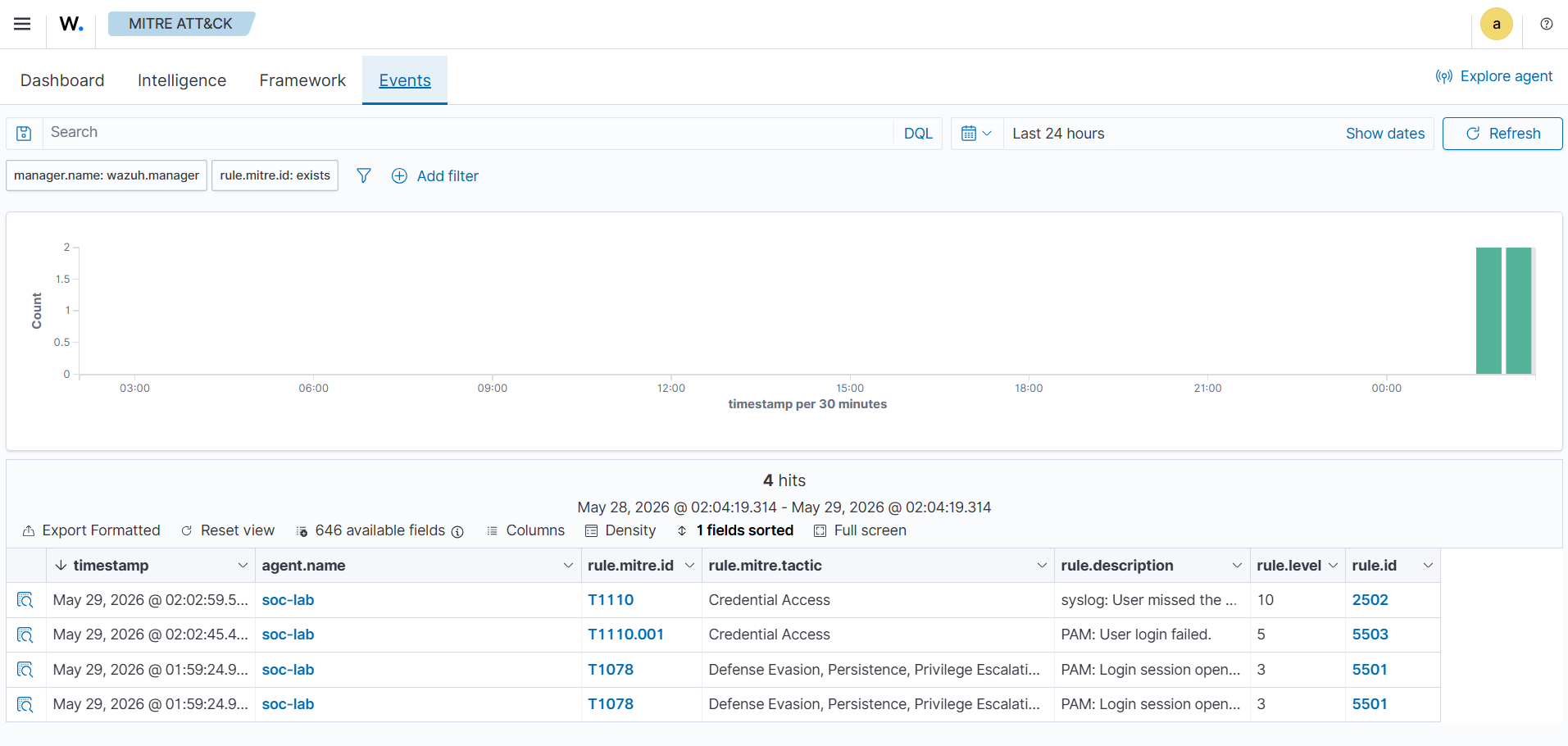
MITRE ATT&CK Concepts
MITRE ATT&CK is a framework used to classify attacker behavior and attack techniques.
Instead of viewing activity as simple logs, MITRE ATT&CK helps categorize events into realistic attack phases.
Example Mapping
| Activity | MITRE Category |
|---|---|
| Nmap Scan | Reconnaissance |
| Hydra SSH Attack | Credential Access |
| sudo su | Privilege Escalation |
| File Modification | Impact / Defense Evasion |
Reconnaissance Activity
Nmap scanning demonstrated:
- service enumeration
- version detection
- OS fingerprinting
These actions are considered reconnaissance because attackers collect information before exploitation.
Credential Access
Hydra brute-force attacks demonstrated:
- repeated password guessing
- automated authentication attempts
- credential abuse
Privilege Escalation
Using:
sudo su
generated:
- privilege escalation logs
- elevated permission activity
- authentication events
inside Wazuh.
SSH Brute Force Simulation
SSH attacks were simulated from Kali Linux.
Manual Authentication Failures
ssh ogisha@192.168.68.59 -p 2222
Repeated incorrect passwords generated:
- authentication failure logs
- brute-force alerts
- suspicious login activity
inside Wazuh.
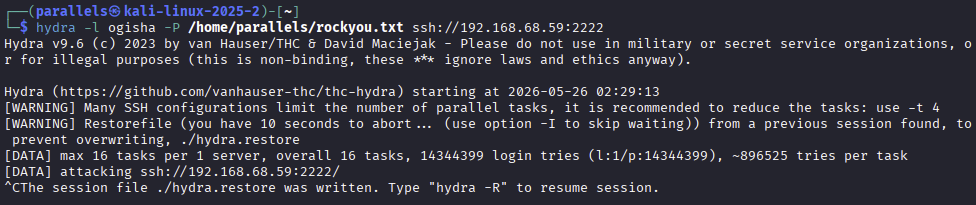
Hydra Brute Force Attack
Extract rockyou.txt:
cp /usr/share/wordlists/rockyou.txt.gz ~
gunzip ~/rockyou.txt.gz
Start Hydra
hydra -l user -P ~/rockyou.txt ssh://192.168.68.59:2222
This generated:
- aggressive login attempts
- repeated SSH failures
- brute-force detections
- Fail2Ban responses
- Wazuh alerts
Nmap Reconnaissance
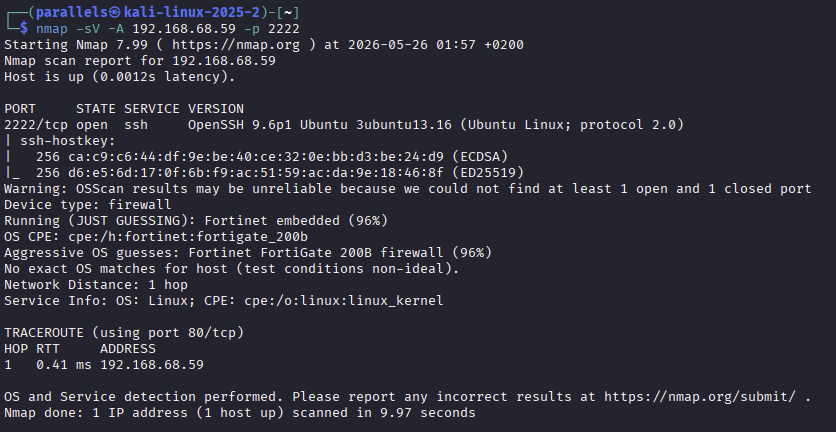
Nmap was used to simulate reconnaissance activity.
nmap -sV -A 192.168.68.59 -p 2222
This demonstrated:
- service discovery
- SSH version detection
- OS fingerprinting
- reconnaissance workflows
The scan identified:
- OpenSSH version
- Linux operating system
- SSH protocol information
This demonstrated how attackers gather information before exploitation.
File Integrity Monitoring (FIM)
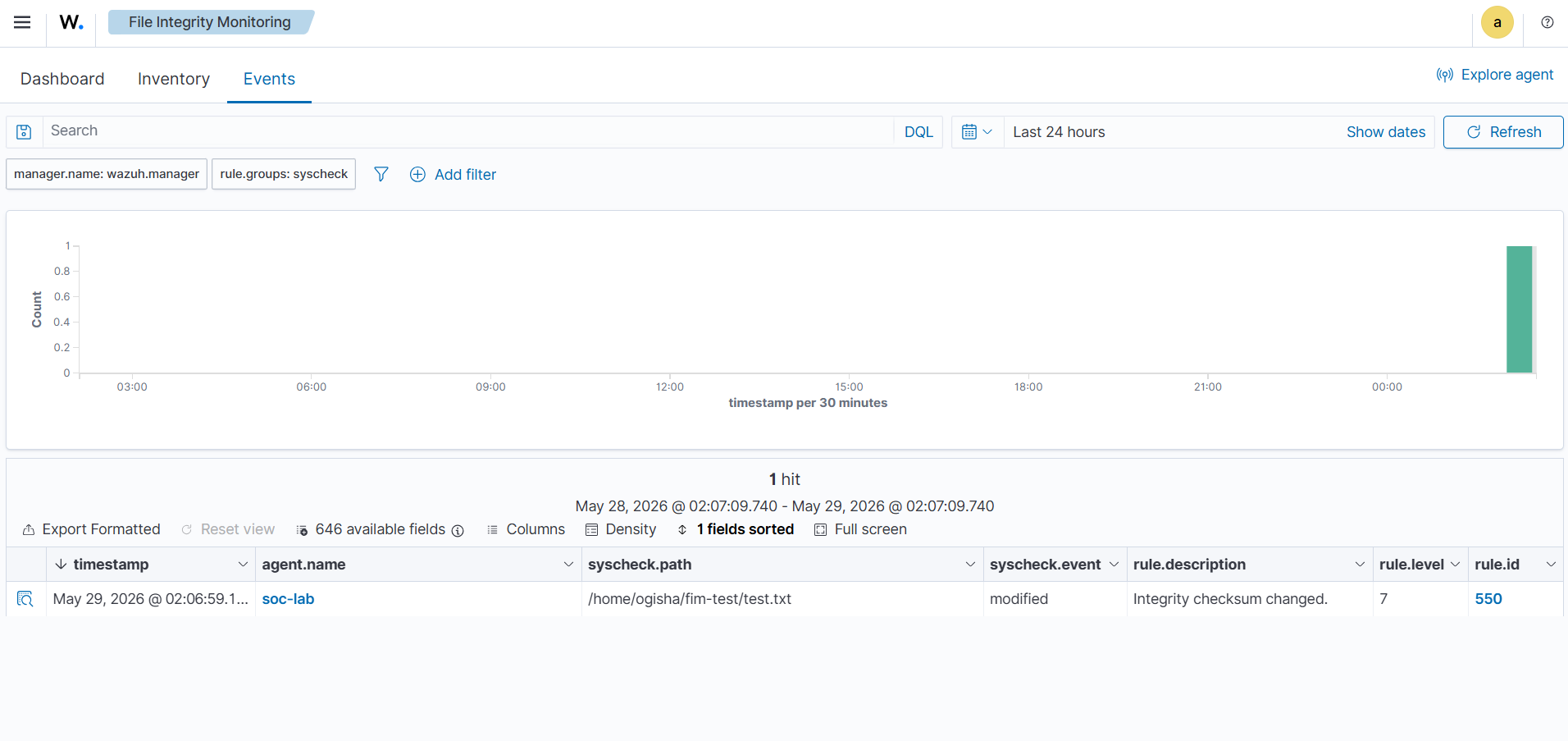
Wazuh File Integrity Monitoring (FIM) was configured to detect unauthorized file changes.
This demonstrated:
- realtime monitoring
- integrity verification
- file modification detection
- change monitoring
Create Test Directory
mkdir ~/fim-test
echo "hello" > ~/fim-test/test.txt
Configure FIM
Edit:
sudo nano /var/ossec/etc/ossec.conf
Inside:
<syscheck>
Add:
<directories realtime="yes">/home/user/fim-test</directories>
Restart the Wazuh Agent
sudo systemctl restart wazuh-agent
Trigger File Events
Modify file:
echo "hacked" >> ~/fim-test/test.txt
Create file:
touch ~/fim-test/newfile.txt
Delete file:
rm ~/fim-test/test.txt
These actions generated:
- file modified alerts
- file created alerts
- file deleted alerts
inside Wazuh.
Fail2Ban Automated Response
Fail2Ban was implemented to automatically block malicious IP addresses after repeated failed SSH login attempts.
This introduced:
- automated response
- attack mitigation
- brute-force protection
into the SOC environment.
Install Fail2Ban
sudo apt install fail2ban -y
Configure Fail2Ban
Edit:
sudo nano /etc/fail2ban/jail.local
Configuration:
[sshd]
enabled = true
port = 22
logpath = /var/log/auth.log
maxretry = 5
findtime = 60
bantime = 600
Restart Fail2Ban
sudo systemctl restart fail2ban
View Status
sudo fail2ban-client status
Detailed SSH jail status:
sudo fail2ban-client status sshd
This displayed:
- banned IP addresses
- failed login counts
- active SSH jail information
Unban IP Addresses
sudo fail2ban-client set sshd unbanip IP-ADDRESS

Cowrie SSH Honeypot
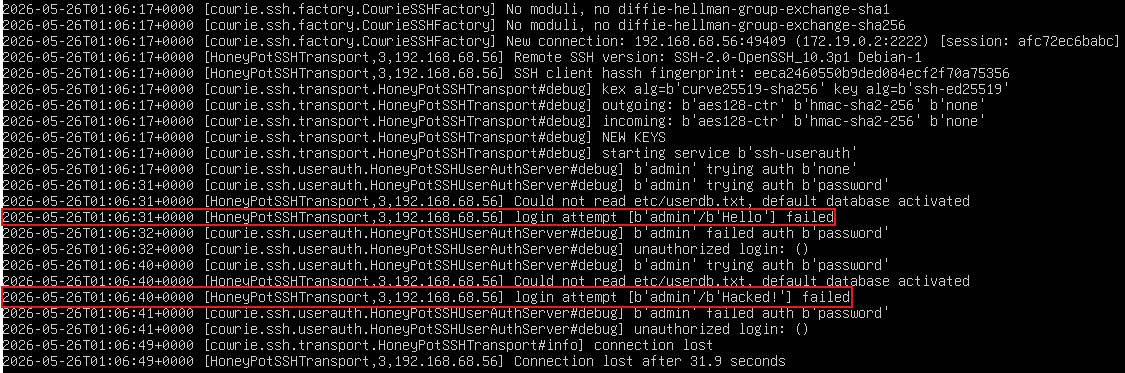
Cowrie is a fake SSH/Telnet service designed to attract attackers and collect threat intelligence.
The purpose of the honeypot was to:
- capture attacker behavior
- log usernames and passwords
- monitor suspicious activity
- analyze fake SSH sessions
Deploying Cowrie
Create directory:
mkdir ~/cowrie-honeypot
cd ~/cowrie-honeypot
docker-compose.yml
services:
  cowrie:
    image: cowrie/cowrie:latest
    container_name: cowrie
    restart: unless-stopped

    ports:
      - "2223:2222"

    volumes:
      - cowrie-var:/cowrie/cowrie-git/var
      - cowrie-etc:/cowrie/cowrie-git/etc

volumes:
  cowrie-var:
  cowrie-etc:
Start Cowrie
docker compose up -d
Connect to the Honeypot
ssh admin@192.168.68.59 -p 2223
Cowrie recorded:
- usernames
- passwords
- commands
- session IDs
- attacker IP addresses
View Honeypot Logs
docker logs cowrie
Inside container:
docker exec -it cowrie bash
Navigate:
cd /cowrie/cowrie-git/var/log/cowrie
View realtime logs:
tail -f cowrie.json
The JSON logs contained:
- session data
- login attempts
- commands
- timestamps
- attacker behavior
Important Commands
| Command | Purpose |
|---|---|
| docker ps | View running containers |
| docker logs cowrie | View honeypot logs |
| fail2ban-client status sshd | View banned IPs |
| wazuh-analysisd -t | Validate Wazuh rules |
| hydra | Simulate brute-force attacks |
| nmap | Reconnaissance scanning |
| tail -f | View realtime logs |
Troubleshooting
API Down After Rule Changes
Cause:
- invalid XML syntax
- broken custom rules
- invalid frequency configuration
Solution:
docker exec single-node-wazuh.manager-1 /var/ossec/bin/wazuh-analysisd -t
This validates the Wazuh configuration before restarting the manager.
SSH Connection Refused
Possible causes:
- Fail2Ban blocked the IP
- wrong IP address
- port forwarding issues
- VirtualBox NAT configuration problems
Future Improvements
Potential future improvements include:
- Suricata IDS integration
- centralized alerting
- internet-exposed honeypot
- additional MITRE ATT&CK mapping
- multiple monitored endpoints
- advanced detection engineering
Conclusion
This project demonstrates the implementation of a realistic SOC and Blue Team infrastructure lab using:
- Wazuh SIEM
- File Integrity Monitoring
- Fail2Ban
- Cowrie Honeypot
- MITRE ATT&CK concepts
- threat hunting workflows
The environment successfully simulated:
- brute-force attacks
- reconnaissance activity
- privilege escalation
- file integrity monitoring
- honeypot interactions
- automated response workflows
The project provided practical experience in:
- Linux security monitoring
- SIEM operation
- detection engineering
- incident response
- honeypot monitoring
- attack simulation
- Blue Team workflows
and serves as a strong foundation for future defensive security and SOC-related projects.